ContactTool

1AlgorithmicArtisan / Chrome extension

ContactTool

Attach a date-stamped note to a Selection.

When did I last contact them?

Avoid duplicate job applications.

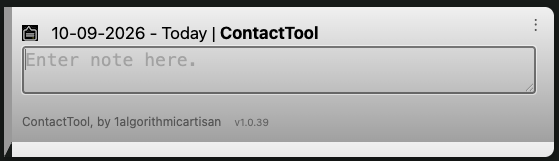
ContactTool bubble showing the contact name beside the last-contact date, with a field for notes

Track job applications and recruiter contacts across job boards and company websites. Remember where you already submitted your resume and when you last followed up.

It remembers so you don't have to. Stop carrying weeks of applications, recruiter conversations, and follow-ups in your head. Leave yourself a date and a note. Unburden yourself.

Date stamps and notes for contacts. Any unique phrase or string will do.

1. Select the contact. 2. Press the hotkey to stamp it.

Select that same text later to see the date you stamped it, how long ago it was, and any notes you added.

Digital download · Chrome extension

ContactTool bubble showing the contact name beside the last-contact date, with a field for notes
No hover: Your contact name, last contact date, and notes.
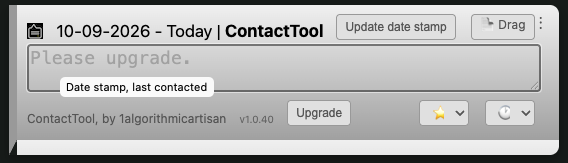
On hover: Nag + Upgrade button. ContactTool bubble with contact name and date, Update date stamp and Drag buttons, and Favorites and Recents menus

On hover: Nag + Upgrade button.

UpgradeAn empty note shows the upgrade reminder. Upgrade removes the reminders.
Update date stampRecord the latest contact. Mac: Command + Shift + L. Other desktops: Ctrl + Shift + Y. Shortcuts can be customized in Chrome.
Drag text / vCardDrag to save a text file. Hold Option / Alt while dragging to save a vCard.
FavoritesSelect a saved, frequently used note.
RecentsSelect a recently used note.

Remember to set your shortcut

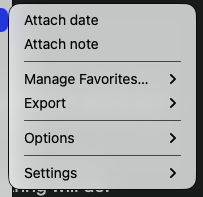
Select a company or contact name, right-click, and choose Attach date from the popup menu. For less effort, we recommend setting a shortcut / hotkey.

  1. Open Chrome and paste chrome://extensions/shortcuts into the address bar.
  2. Find ContactTool and assign a shortcut to Attach date stamp popup to selection. Select a contact and press your shortcut.
Example shortcut; choose your own.
Menu alternative: select a contact, then choose Attach date.

A memory for the next visit

A company or contact name is more useful with a history.

01

Job hunting

Remember applications, recruiter conversations, and follow-ups across job boards and company websites.

02

Sales & outreach

Keep the last contact date and conversation notes close to a prospect's name.

03

Shopping & research

Record why a listing caught your eye, why you passed, or what you are waiting for.

Dates. Notes. Useful little details.
Your context, back where you need it.

Date stamps
Keep a last-contact date, see elapsed time, or use date-and-time stamps for more precise records.
Notes
Keep status, next steps, and the details you would otherwise have to look up again.
Favorites & recents
Convenience: select a note from favorites or recents instead of typing it again.
Drag & export
Drag an entry out to a text file, or hold Option / Alt to save a vCard. Export records by date or name, and import a backup when needed.
Optional breadcrumbs
Keep an audit trail with the page URL alongside your records.
Local records
Contact records are stored in your browser. Export and import let you keep a backup or move them to another computer.
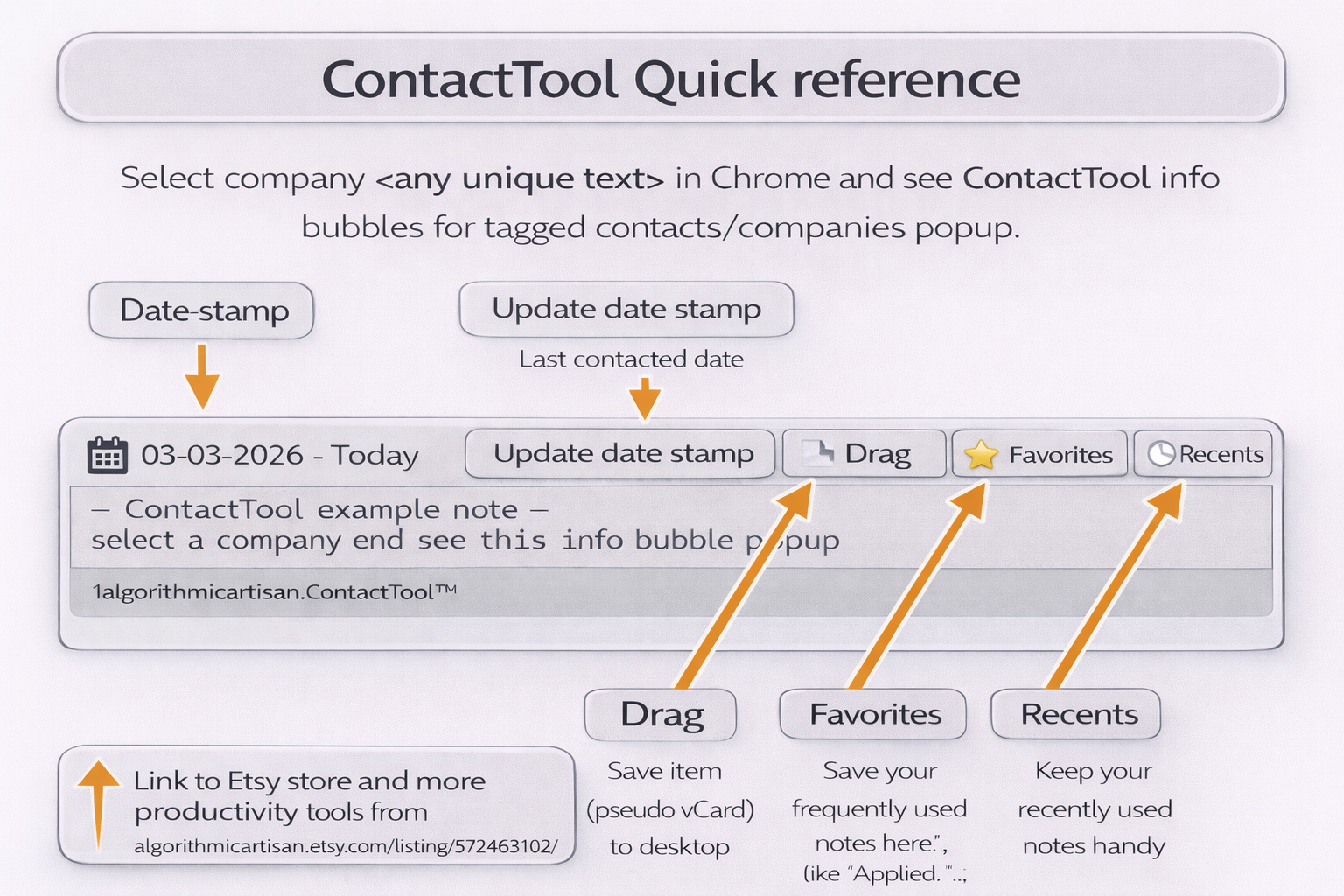
ContactTool quick reference identifying the date stamp, update date, drag, favorites, and recents controls
ContactTool quick reference

From my workbench

ContactTool for your browser.

The upcoming Chrome Web Store edition keeps date stamps and notes available without payment. Please upgrade to remove the reminders. After payment through ExtensionPay, the reminders and Upgrade button disappear. Already paid? Restore your purchase from the bubble menu.

Available as a digital download through Etsy, with extension files and installation instructions. Installed as an unpacked Chrome extension.

Privacy policy · Updated October 9, 2026

Privacy & Data

ContactTool is developed by Jean Tantra / 1AlgorithmicArtisan. This policy covers the extension, its optional paid upgrade, and this website.

Contacts and notes
ContactTool reads selected text and matches saved entries on pages where it is enabled. Contact keys, date stamps, notes, favorites, recents, and preferences are stored in your browser’s local extension storage to provide these features. They are not uploaded to the developer or sent to ExtensionPay or Stripe.
Optional breadcrumbs and exports
If you enable breadcrumbs, ContactTool reads the current page URL and saves it with the contact and timestamp in a downloaded file. Exports and dragged text/vCard files are saved where you choose. These files are not encrypted by ContactTool; you control any sharing or backup.
Upgrade and payment
ExtensionPay receives an installation identifier and technical connection information when checking payment status. If you buy an upgrade or restore a purchase, ExtensionPay and Stripe process your email address and relevant transaction/payment information. We keep your purchase email private and use it only to process the purchase, provide receipts, restore paid access, and handle purchase support; we do not sell it or use it for marketing. ContactTool does not receive your full card details. The extension stores payment identifiers and status; ExtensionPay uses browser sync storage where available, otherwise local storage. Browser sync may transfer that payment data through your browser provider.
Your control and retention
You can edit or delete individual notes, clear records through the extension’s controls, and export a backup. Local records remain until you delete them or remove the extension; downloaded files must be deleted separately. Payment/account records are held by the payment providers under their policies. Contact support for purchase or privacy requests; information you email is used to respond and kept as needed for support and applicable recordkeeping.
Website and security
Netlify hosts this website and may process connection information such as IP addresses and browser/request details to deliver and secure it. This site currently embeds no analytics tracker. Payment connections use HTTPS. Local data relies on browser and operating-system security; do not store passwords or other secrets in notes.
Limited use
ContactTool’s use of data follows the Chrome Web Store User Data Policy, including its Limited Use requirements. Data is used to provide the described contact/date/note features, purchase verification, and support, not sold or used for advertising.

ExtensionPay · Stripe · Netlify

ContactTool.techsupport@metatheory.com